Skip to content

For school psychologists and school-based BCBAs

The complete system for behavioral observation.

Plan, record, analyze, and write up observations in one tool: a desktop app that runs on your machine.

  • Desktop app for macOS & Windows
  • iPhone companion
  • Works offline

One workspace per student

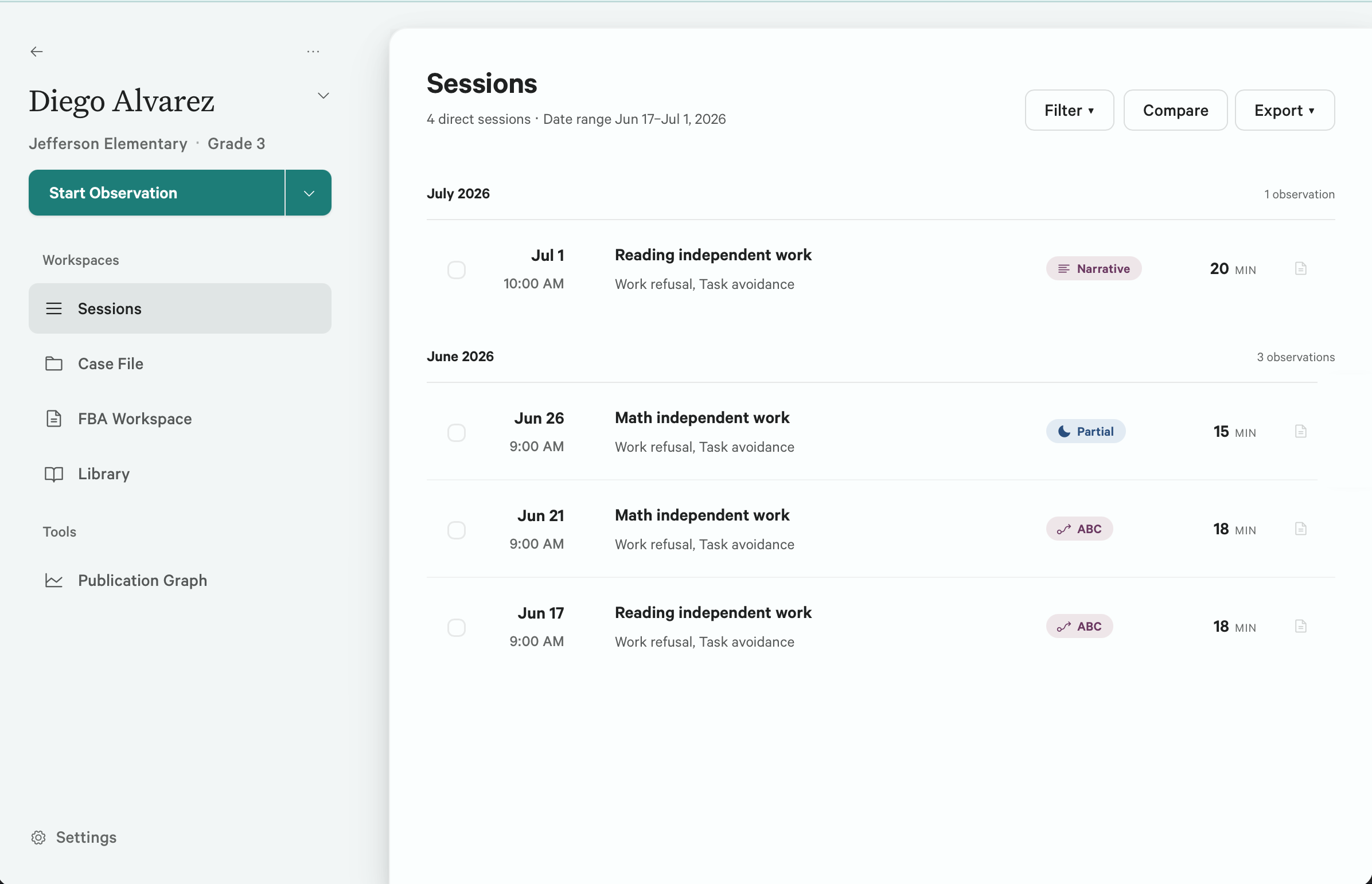
A student’s session list in Sightline: four observations grouped by month, each tagged with the method that produced it, its duration, and the behaviors recorded.

The second observation of a student shouldn’t start from scratch. Every session, result, comparison, and draft for one student stays in a single workspace, so a case builds instead of scattering.

One session. Eight ways to score it.

Every method is a different reading of the same ten minutes. Choose one and Sightline changes the clock, the scoring controls, the event record, and the results around it. No rebuilt spreadsheet for every referral.

Result

The observation

What actually happened.

10:00

Partial interval

Did it occur at any point?

6 of 10

Whole interval

Did it last the whole interval?

1 of 10

Momentary sampling

Was it happening at the end?

2 of 10

Frequency

Every occurrence, counted.

5

Duration

Total time it lasted.

2:13

Latency

Cue to first occurrence.

0:20 avg

ABC

Antecedent, behavior, consequence.

ABCABCABCABCABC
5 records

Narrative

Timestamped prose as you type.

0:40Left seat4:00Escalated after demand7:10Back on task
412 words
The same ten minutes, eight different results. Choosing the method is choosing what the record can say.

All eight methods are included in Free.

One tool, from the first interval to the write-up.

Standard practice runs a single observation through a paper sheet, a timer app, a spreadsheet, and a word processor. Every handoff is a chance to mistype a number or lose the context that explained it. Sightline keeps the session, its results, and the write-up in one place, entered once.

  1. Observe

    The record is finished when the session is.

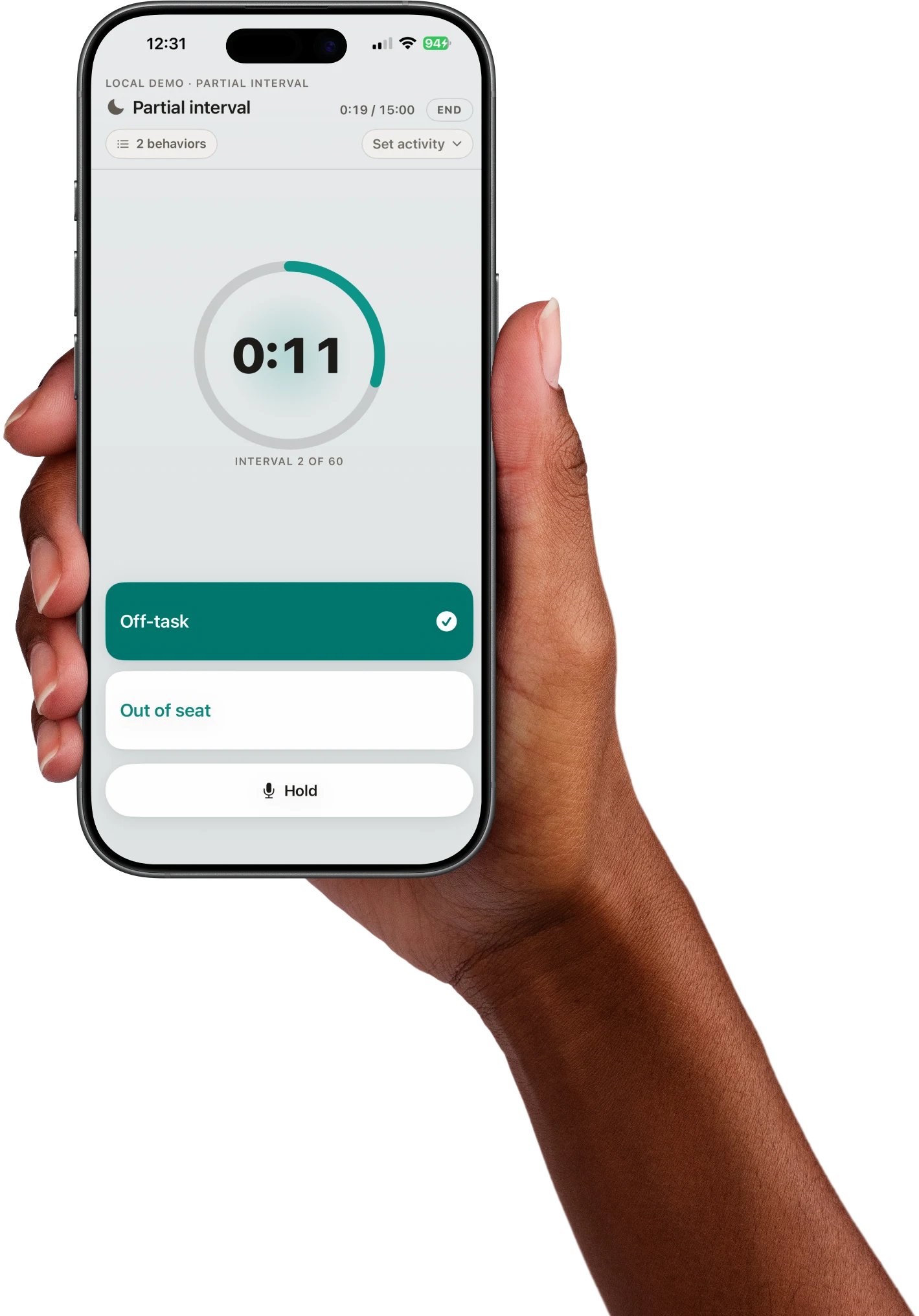
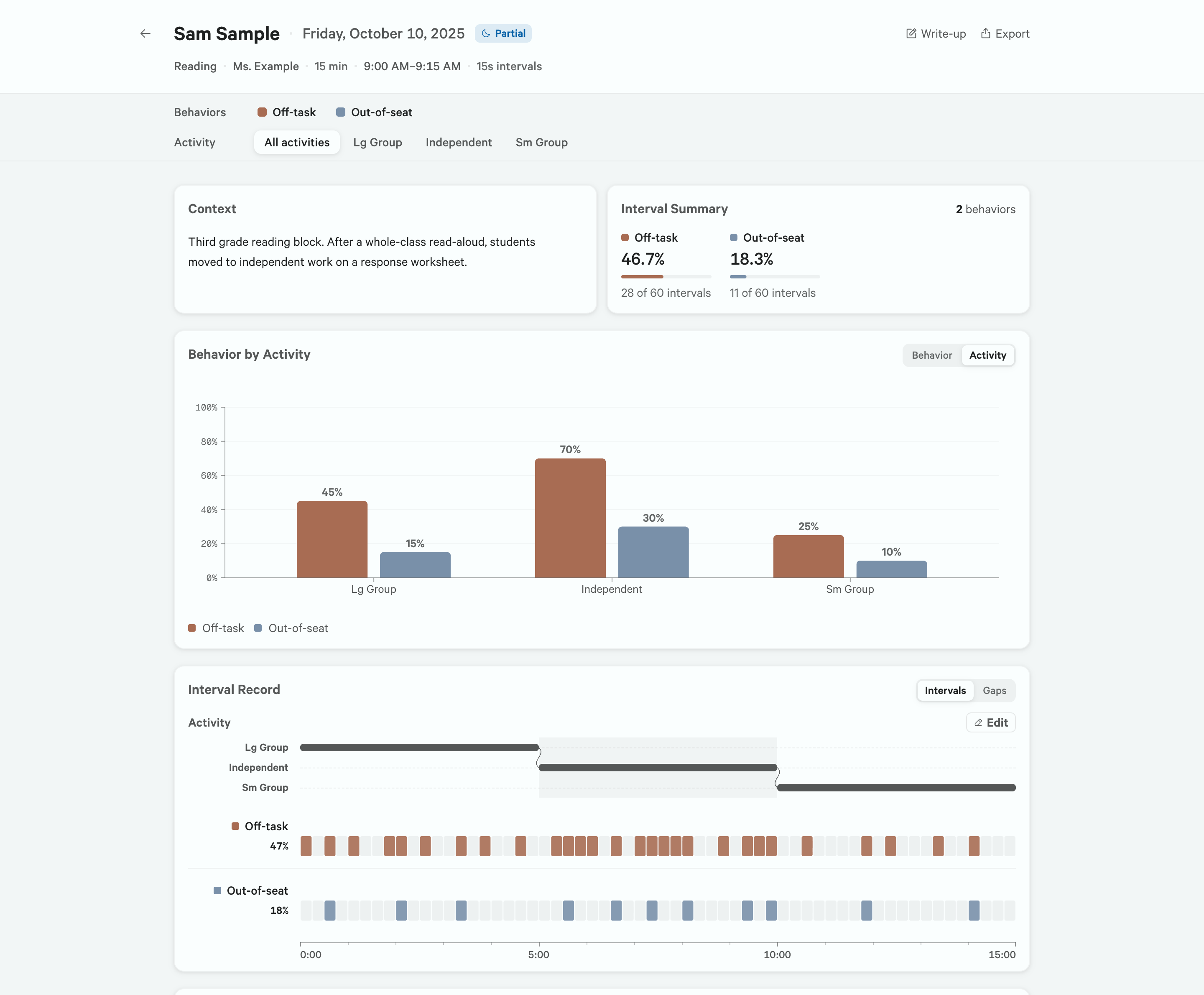
    Score by keystroke while the clock runs. The activity, the session notes, and the timestamped log stay on one screen.

    The Sightline recording screen during a partial-interval session: a running interval clock, the current activity, scoring controls for two behaviors with their interval grids, and session notes and a timestamped observation log beside them.
  2. Analyze

    See whether the pattern holds.

    Place sessions on one chart, keep their settings and activities attached, and inspect the change without flattening separate observations into one blob of data.

    Sightline’s cross-session comparison for one student: fifteen observations plotted across a baseline phase and a self-monitoring phase, separated by a phase line, with off-task at 59.3 percent during baseline and 23.0 percent afterward.
  3. Report

    The draft opens beside its evidence.

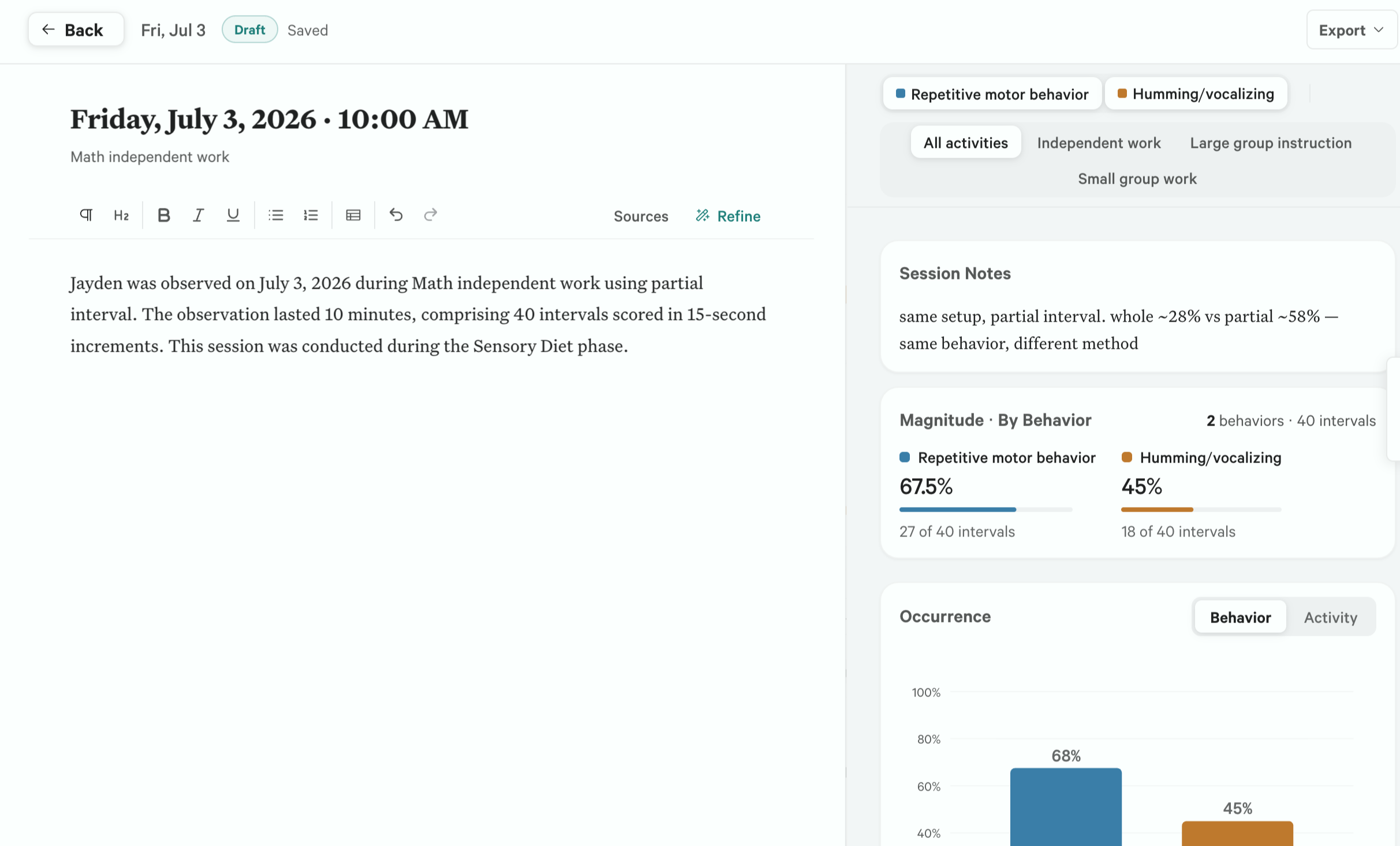
    Pro drafts the write-up locally from the data you coded, and the draft sits next to that data. Every figure in the prose can be checked against the session that produced it before you revise and sign.

    The Sightline write-up workspace: an editable draft describing the observation on the left, with the session’s notes, per-behavior percentages, and occurrence chart on the right.

iPhone companion

Continue recording, untethered.

Need to move around the room, record outside, or step away from the computer? Use your iPhone to score behaviors, mark activity changes, and capture notes.

Paired live
Scores, activity changes, and notes land in the desktop session while you move around the room.
Untethered
Step away from the computer and the observation stays on the iPhone, transferring when your devices reconnect.
Voice notes
Capture a note mid-session. Audio follows the same local path and is transcribed on the desktop, not by a cloud service.
Silent haptics
Every score you enter is confirmed by a tap you can feel, so the phone stays quiet in the room.

Apple Watch coming this fall.

Explore Companion

The AI that drafts your write-up runs on your computer.

It works from the record you coded: a write-up drafted for you to edit, session summaries, and function hypotheses, with every figure traceable to the session that produced it.

Anything that sends student records to a company carries a data-sharing agreement your district has to put in place first. Sightline never sends student data anywhere, so there is nothing to put in place.

Download it and start. Sightline never sends a student’s record anywhere, on the trial or ever after.

Why we built it this way
Your computer
  1. Observation record
  2. Structured analysis
  3. Local model
  4. Draft for review
The internet

The app, the model, updates

Student data: nothing, ever

The practitioner stays responsible. Sightline drafts and analyzes; reviewing the language against the record, and signing what you send, remain professional judgment.

No FERPA disclosure to manage

Sensitive work belongs on devices you control.

Student information, observations, notes, recordings, analyses, and reports stay on your devices. Sightline runs AI locally and doesn’t operate a cloud for your records.

Where the AI runs
Cloud report tools:On the company’s servers
On your computer
Where student data lives
Cloud report tools:In the vendor’s cloud database
A local file on your machine
What the free trial means
Cloud report tools:Records reach their servers before anything is signed
The trial runs entirely on your machine
Getting your data out
Cloud report tools:Held inside their system
Export anytime: CSV, PDF, backup
What travels over the internet
Cloud report tools:Your students’ records
Never a student’s records

Buying your own tool? This difference is most of what you are buying. There is no data-sharing agreement to chase and nothing lands on someone else’s servers, on the trial or ever after.

Sightline’s automatic internet connections are limited to licensing, updates, and model downloads. They are designed not to include student-record content. District policy still governs approval, access, consent, retention, exports, and disclosures.

Read the complete privacy details →

Free records. Starter organizes and analyzes. Pro drafts.

Begin with every observation method and unlimited sessions. Upgrade only when you need analysis or local drafting.

Free
$0

The complete recorder for school-based observation.

  • All eight methods
  • Unlimited sessions
  • Raw event log and CSV
  • Local backup and restore
Download
Starter
$14/month

A workspace for every student evaluation.

  • Observations organized by student
  • Results and charts for every method
  • Cross-session and function analysis
  • Write-up workspace and PDF export
Choose Starter
ProFounding rate
$19/month

Local drafting, AI-assisted synthesis, and untethered recording.

  • Drafted write-up from coded data
  • AI-assisted summaries and revisions
  • iPhone companion
  • On-device AI and voice transcription
Founding pricing closes Dec 31, 2026.Locked at $19/month. New customers pay $24/month after close.
Choose Pro
Every download begins with 21 days of Pro.The trial starts with your first recorded session. Sightline stays on Free afterward.

Record the session. Finish the write-up.

Keep the observation, the computed evidence, and the editable narrative in one local desktop app.

Download SightlineFor macOS and Windows